


JBL One
4.6478.00 Reviews
App Specs
- Version
- 2.7.9
- Updated On
- License
- Free
- Downloads
- 1,000,000+
- Developer
- Harman Consumer, Inc.
- Categories
- Music & Audio
- Platform
- Android, iOS
Screenshots
 Analysis by AppCompare
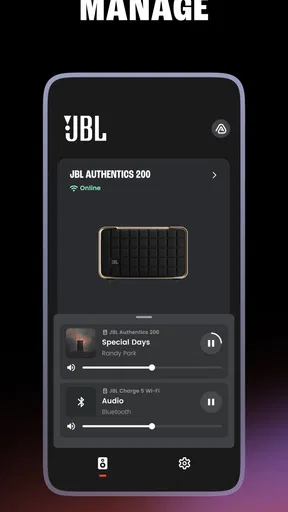
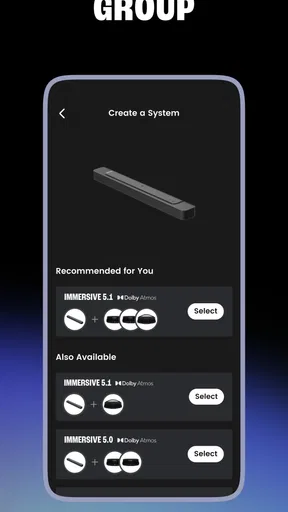
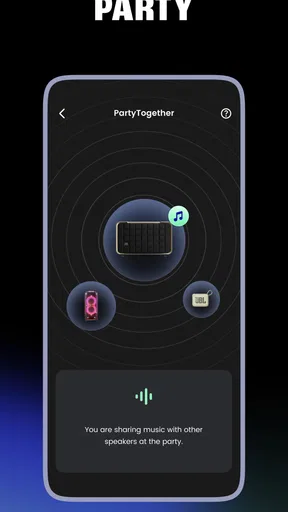
I find speaker-control apps most useful in the small moments when a household is trying to agree on what to listen to, rather than when someone is browsing settings for fun. One person wants music in the kitchen, another is watching something in the living room, and a speaker or soundbar needs a quick adjustment. JBL One is aimed at that kind of practical control: it brings compatible JBL Wi-Fi and Bluetooth speakers, soundbars, PartyBox models, and BandBox models into an app for music and audio management.
That focus makes it different from a streaming service. It is not where I would go first to discover new artists or build a music library; it is the companion I would reach for when I want to manage the JBL gear already in my home. Developed by Harman Consumer, Inc., the free app has a 4.6 average from around 33,000 ratings and more than a million installs. Those figures suggest broad use, but the real question for a household is simpler: does it make shared audio less fiddly?
When one speaker belongs to the whole household
When several people share one speaker, the tricky part is often not connecting to it but keeping its use predictable as the room and listener change. I’d treat this section as a look at where a dedicated equipment app can help—and where it should leave music choices to each person’s preferred service. That distinction sets up the compatibility question next.
Useful control without taking over the music choice
In a shared home, the same speaker can serve very different purposes throughout the day. I might use a compatible JBL speaker for quiet background music while cooking, while someone else later wants a livelier session on a PartyBox. Having an app built around managing JBL equipment gives me a place to handle the device side of those changes, rather than treating every speaker as an isolated gadget.
The distinction matters. A music app helps choose and play audio; a speaker companion helps you work with the hardware. JBL One makes more sense as part of a two-app routine: use whichever service you prefer for listening, then turn to the JBL app when the speaker or soundbar itself needs attention. If you expect one app to replace your streaming service, this is the wrong tool. If you already own supported JBL equipment, the focused role can be a plus.
For a realistic household routine, I would keep the phone that is most often used to adjust the living-room system readily available, but avoid making it the only way anyone can listen. A family member can still use their usual music service and Bluetooth connection where supported; the companion app is most valuable when someone needs to manage the JBL device rather than simply start a track. That separation helps prevent the common confusion between “the music app isn’t working” and “the speaker needs attention.”
Check compatibility before making it the household hub
JBL One is not a universal remote for every audio product in a home. Its purpose is to control compatible JBL Wi-Fi and Bluetooth speakers, soundbars, PartyBox and BandBox models. If your household mixes brands, or owns an older JBL product that is not supported, do not assume it will appear just because it has the JBL name on it. I would check the exact model against the app’s current compatibility information before planning a setup around it.
Worth Reading Before You Choose

Flipboard Shows What News Apps Must Do Beyond the Feed

Switching to Android Auto Means Rethinking Your Driving Routine

Google Calendar Makes a Crowded Week Easier to Manage

Ludo King Makes the Most of the Minutes Between Plans

Baby Panda World Brings Quick Play to Modern Phones, but Its Game Library Feels Busy

ESPN’s Live Game View Makes Following Close Games Easier
This is also where the app differs from a general Bluetooth settings screen. Phone settings are often enough for a quick connection to a single speaker, but they are not designed to be a dedicated control point for a range of JBL audio equipment. Conversely, if all you ever do is connect one Bluetooth speaker and press play, switching between system settings and your music app may be simpler than adding another app to your routine.
Setting boundaries on shared phones and devices
Before making a shared phone the household’s audio-control point, I’d check both the exact JBL model and whether that phone can run the app. This is less about creating rigid rules than avoiding a routine built around a device that cannot support it; a simple backup listening method can keep the speaker usable while someone sorts out control access. From there, the household can decide who handles adjustments.
Keep the control role clear
In a shared-device home, I would decide early which phone or tablet is the main place for speaker adjustments. That does not mean everyone else must use it; it simply gives the household a reliable starting point if someone changes a setting and later cannot remember where. Keeping the companion app on one frequently available device can reduce accidental changes and make troubleshooting less of a scavenger hunt.
I would also keep the listening account separate from the speaker-control habit in my own thinking. JBL One is the equipment companion, not a household music library. Each person can have their own preferences in a streaming service, while the app remains the place to manage compatible JBL hardware. That boundary is especially helpful when children or guests borrow a phone: handing over a music app for a playlist is not the same as handing over the device-management app.
There is a trade-off, though. A household that expects a single app to coordinate every brand, every music service, and every person’s preferences may find this arrangement fragmented. JBL One is strongest when the audio gear is predominantly compatible JBL equipment. If the home is built around another manufacturer’s ecosystem, that maker’s companion app is likely to be a more natural control center.
A smoother handoff between rooms
One practical tip is to agree on a simple handoff routine: the person finishing with a speaker leaves it in a state the next listener can understand, and the next person uses their preferred music service for playback. The companion app then stays available for equipment adjustments, rather than becoming the place where everyone tries to solve every audio problem. That small habit can be more useful than repeatedly reinstalling apps or changing phone settings when a speaker behaves differently from one session to another.
For a soundbar, a shared home may have a different pattern from a portable speaker: one person may use it for television audio, while another wants it for music. I would treat the soundbar as a shared household device and make sure other listeners know which app is for the soundbar and which source or service they normally use. The app’s value here is having a dedicated JBL control route; it does not remove the need for people to agree on how the room’s audio is used.
Coordination, age context, and trust
Shared audio works best when people know whether they are choosing a track or changing the equipment. I’d keep that distinction especially clear for younger listeners and guests, since access to a phone does not automatically mean they need to manage a soundbar or speaker. The next section considers how age suitability and ordinary household trust fit into that practical arrangement.
Agree on who makes changes
JBL One can support a more orderly routine, but an app cannot create household coordination on its own. If one person adjusts the soundbar or speaker and another later wants a different setup, a quick conversation is still the simplest fix. I would avoid assuming that installing the app automatically gives every family member a shared profile or a permission system. The app is best approached as a tool for controlling compatible equipment, not as a family-management service.
That distinction also affects account boundaries. I would use the app in the way that makes sense for the device and the person responsible for it, without treating access to the phone as proof that everyone should change the setup. A parent can keep control of the device-management routine while letting older children choose music in their own streaming apps. For guests, a direct Bluetooth connection may be more straightforward when they only need to play audio temporarily and do not need to manage the speaker itself.
Suitable for general audiences, with ordinary supervision
The app is rated for Everyone, which makes it broadly suitable from an age-classification perspective. That does not mean every household should give a young child unrestricted access to every phone or music account. I would still consider the child’s age, the content available through the separate listening service, and whether they should be changing audio-device settings. The app’s age rating is not a substitute for the household’s own rules about music, screen access, or purchases in other apps.
For a teenager who already uses a phone confidently, JBL One can be a practical way to learn how a shared speaker or soundbar is managed. For a younger child, I would keep the device controls with an adult and let the child request music or use an appropriate listening setup. That is not a limitation unique to JBL; it is simply a sensible boundary when several people rely on the same audio equipment.
At the time of this review, the current version is 2.7.9 and the minimum operating-system requirement is Android 10. That is worth checking before making it the default tool on an older household phone. If the device cannot run the app, the family may need to rely on other available ways of using the speaker, such as its supported Bluetooth connection, rather than building a shared routine around the app.
What to expect from the app’s role
Because JBL One sits between a phone and JBL audio hardware, I would judge it by whether it makes those devices easier to handle, not by the depth of its music catalog or social features. It belongs to the music-and-audio category, but it is a companion utility rather than a substitute for a streaming platform. This is a useful distinction when comparing it with the usual alternatives: a music service is better for finding and organizing songs, phone Bluetooth controls are fine for a one-off connection, and a manufacturer’s app is usually the better place to manage that manufacturer’s supported equipment.
A non-obvious benefit of that division is that it can make troubleshooting more deliberate. If playback works in one service but the speaker itself needs a change, I know to look in the JBL companion app. If the app is not relevant to the problem, I can return to the music service or phone connection instead of altering device settings at random. It is not a guarantee that every issue disappears, but having a clear tool for the equipment side can help a shared household narrow down what actually went wrong.
The limitation is just as clear: the app’s usefulness depends on owning compatible JBL products and being comfortable with a separate control app. Someone with a mixed-brand setup may end up switching between several manufacturer apps. Someone who only uses a single Bluetooth speaker casually may prefer the phone’s built-in controls. I would not install it just because I listen to music; I would install it because I own JBL equipment that I want to manage through it.
My household verdict
My household verdict comes down to whether compatible JBL equipment is part of everyday listening and whether a separate control app solves a real annoyance. I’d use it when its hardware-focused role makes handoffs clearer, but I would not add it simply because the family listens to music. The closing recommendation weighs that benefit against the simpler alternatives for homes with different gear or habits.
Best when JBL gear is part of daily life
I would recommend JBL One to someone who has compatible JBL speakers, a soundbar, a PartyBox, or a BandBox in regular household use and wants a dedicated way to manage that gear. It is particularly sensible when several people share the same audio equipment but use different music services or listening habits. The free price makes it easy to try, and its broad Everyone rating suits a general household audience, provided adults still set sensible boundaries around devices and listening accounts.
I would skip it if you do not own supported JBL equipment, want an all-in-one music service, or rely on a different brand’s ecosystem. I would also avoid making it the center of a family audio plan until checking that the exact device and phone are compatible. Those are practical checks, not reasons to dismiss the app; they simply define where its value begins and ends.
My overall view is that JBL One is most useful as a calm, clearly scoped companion: music services handle the songs, while the JBL app handles compatible JBL equipment. In a shared home, that separation can make handoffs and basic coordination easier, as long as everyone understands who is managing the hardware and who is choosing what to play. If that matches your setup, it earns a place on the household phone; if not, your existing music app or phone controls may be enough.
Pros
- Works with a wide range of JBL Wi-Fi speakers and soundbars.
- Lets you group compatible speakers for multiroom playback.
- Provides app-based setup and control for supported devices.
- Offers access to music services from a single interface.
- Can help manage speaker settings without using physical controls.
Cons
- Many features require a compatible JBL device.
- Available music services and features vary by region and product.
- Setup may be confusing if the speaker is not on the same Wi-Fi network.
- Some users report occasional connection or device-discovery issues.
- The app may offer limited value if you only use Bluetooth playback.
FAQs for JBL One
What is JBL One, and what can I use it for?
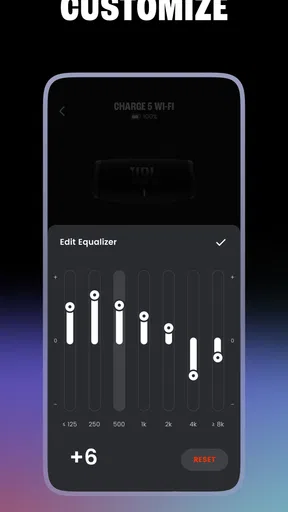
JBL One is JBL’s companion app for setting up and managing compatible JBL speakers and soundbars. Depending on the connected product, you can use it to join a Wi-Fi network, adjust audio settings, customize sound, and access supported music or streaming services. The available controls and features vary by device, so check that your specific JBL model is supported before downloading.
Which JBL speakers and soundbars are compatible with JBL One?
JBL One works with selected JBL products, rather than every speaker or soundbar made by JBL. Compatibility depends on the model and may also affect which app features are available. Before installing, look up your product in JBL’s official compatibility information or its setup instructions. If your device is not supported, you may need a different JBL app or another connection method.
How do I set up a JBL device with the JBL One app?
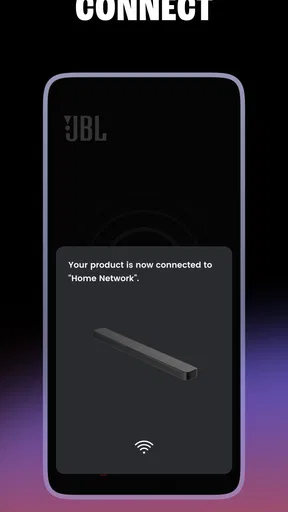
Typically, you open JBL One, follow the on-screen instructions, and connect your compatible device to the same Wi-Fi network as your phone. Keep the speaker or soundbar powered on and allow the app to request any necessary local-network or Bluetooth permissions. Setup steps can differ between products, and a weak Wi-Fi signal, an incompatible network, or outdated device software may interrupt the process.
Does JBL One let me control sound and streaming services?
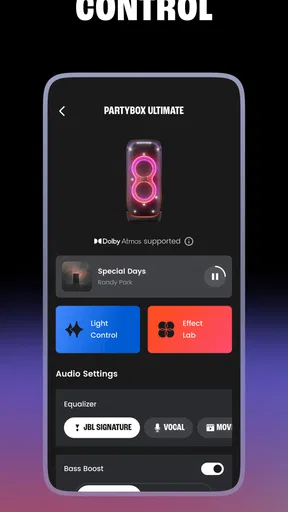
For supported products, JBL One may provide audio controls such as sound customization or room-related settings, along with access to compatible streaming services. The exact options depend on both your JBL device and your region; not every service or control is available on every model. You may also need to sign in to a streaming account or configure services separately before using them through the app.
Is JBL One free, and what should I know before downloading it?
JBL One is generally available to download without a separate app purchase, but using some streaming services may require paid subscriptions, and mobile data or internet charges can apply. Check the app-store listing for current device requirements, permissions, and availability in your country. To avoid setup problems, confirm your JBL product is compatible, update your phone’s software, and have access to a reliable Wi-Fi network.


